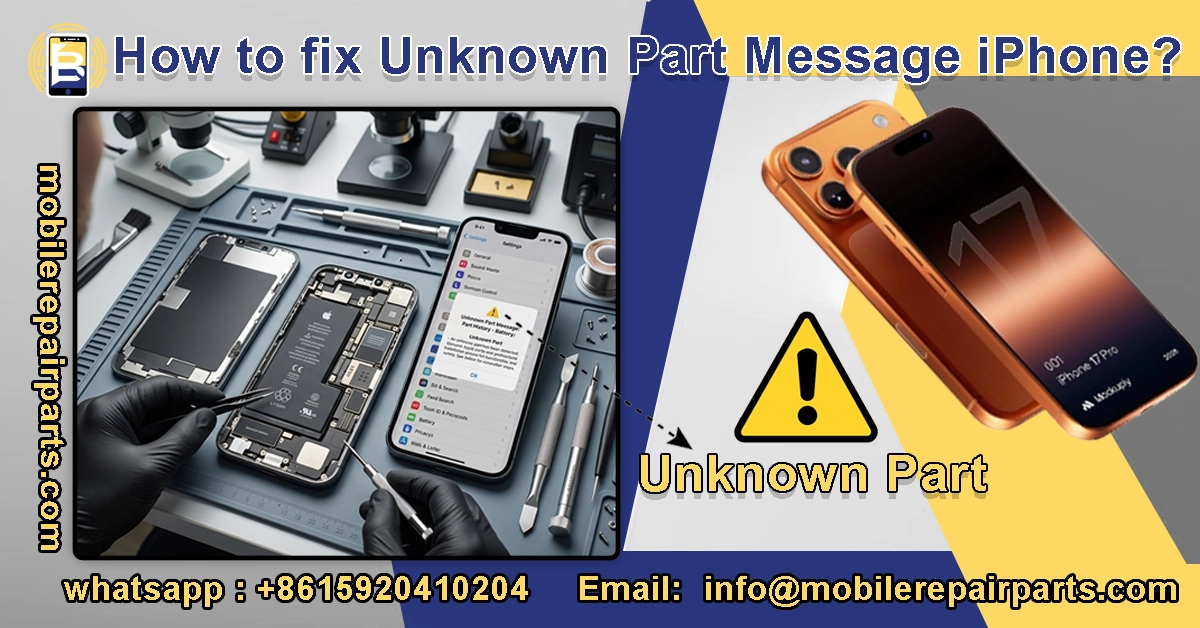
You did everything right: a high-quality replacement part, a precise installation, and no visible errors—yet your iPhone still displays the “Unknown Part” message iPhone.
This is one of the most common (and most confusing) issues in modern iPhone repair.
The good news is that this problem can be solved if you understand how Apple’s parts verification system works.
In this guide, we provide a detailed, step-by-step explanation of the precise solutions technicians use to resolve this issue.
|
📘 Summary The “Unknown Part” message on iPhones appears after replacing batteries, screens, cameras, or sensors when the iPhone cannot verify the part. This is common in repair shops and can affect customer trust. The article explains why the message occurs, how technicians can diagnose it, practical solutions for battery and screen repairs, and best practices for wholesalers to supply compatible parts. |
🔍 Key Highlights
|
Table of Contents
What is the “Unknown Part” message on the iPhone?
The Unknown Part message appears on the iPhone after a repair when the phone detects that the replaced part is not recognized as an original part associated with the device. For repair shops, this message is not just a simple notification; it can affect customer trust and service quality, and lead to more post-repair complaints. For wholesalers, however, it is an opportunity to offer parts that are more reliable and easier for technicians to install.
The message usually appears after replacing the screen, battery, camera, or certain sensors, depending on the model and repair method. The solution varies by case: the phone may require proper data transfer, correct component connection, or the use of a high-quality, compatible part. Therefore, technicians should treat the iPhone “Unknown Part” message as a procedural issue, not merely a component issue, as it often indicates the need to adjust repair steps with greater care.
Where does the “Unknown Part” message appear on the iPhone?
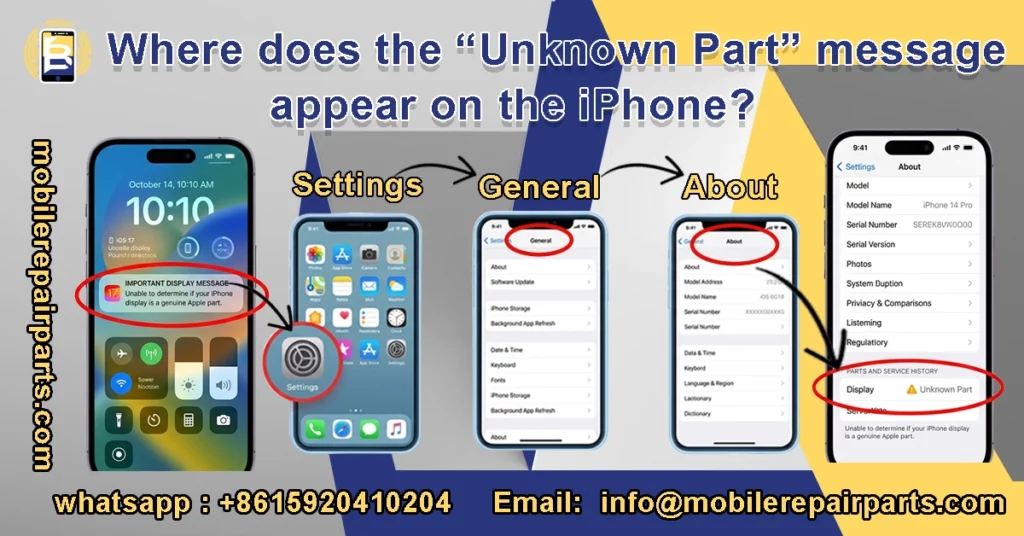
It usually appears in:
- Settings → General → About. There you’ll see a list titled “Parts & Service History” and next to the replaced part (such as the battery or screen), the phrase “Unknown Part” will appear.
- The lock screen displays a temporary warning when you turn on the iPhone or after a repair.
Why does the “Unknown Part” message appear on iPhones?
The “Unknown Part” message appears when the iPhone cannot verify that the replaced component is originally associated with the phone or matches the calibration record. In other words, the phone is telling the user that the part may be original, refurbished, from the secondary market, or installed without the required data transfer.
Reasons for the message:
- Component Matching System: Apple links each part to the logic board via serial numbers and encryption chips. If they don’t match, the message appears.
- Non-genuine or uncertified parts: Even high-quality parts from the aftermarket can trigger the warning, because quality doesn’t mean official verification by Apple.
- Used parts from another phone: Even genuine parts may trigger the warning if they were previously connected to another iPhone.
- Improper installation: Issues such as damaged flex cables, loose connections, or missing sensors can also cause the message to appear.
Which Parts Most Often Trigger the Unknown Part Message iPhone?
The “Unknown Part” message appears more frequently on iPhones when replacing components that require exact compatibility with the phone’s hardware and software.
- Battery: A “Battery not verified” warning appears, with a moderate impact on usage.
- Screen: The “Unknown display” warning often appears, and it has the greatest impact on the user experience.
- Camera: The “Camera not recognized” message may appear, with a moderate impact on the iPhone.
What should technicians check first?
The first step is to identify which component caused the “Unknown Part” message on the iPhone. A screen issue is different from a battery issue, and a camera problem is not the same as a screen problem. Before opening the phone, check:
- Previous repair history
- Model of the replaced part
- iOS version
- Whether the part was transferred, reprogrammed, or simply replaced.
Start with a structured diagnostic sequence:
- Note when the warning appears: at startup, after a system update, or when using a specific feature.
- Visually inspect the part and compare it to a known-good unit.
- If the warning recurs in the same workshop, the cause may be in the workflow rather than a single part.
How to Solve Unknown Part Message iPhone After a Screen Repair?
After replacing the screen, the “Unknown Part” message on an iPhone often requires one of the following solutions:
- Properly transferring the original screen IC chip.
- Using an assembly compatible with diagnostic tools.
- Performing a verified data copy (such as True Tone).
Repair tests have shown that after copying True Tone data and transferring the original IC chip to a replacement screen, the message disappears and True Tone is restored.
Technicians must maintain an organized and repeatable repair process:
- Use tools that are safe from static electricity (ESD).
- Stable temperature, clean flex, proper soldering, and precise alignment.
- Do not assume the display itself is damaged before verifying the data transfer path and the condition of the sensor flex.
- In some cases, testing the display without connecting the sensor flex helps isolate the issue before final assembly.
Read also:
- What’s the Difference Between OLED, In-Cell, and TFT iPhone Screens.
- iPhone 16 Pro Max Screen Wholesale.
- iPhone 15 Screen Repair Guide for Latin American.
How to Solve Unknown Part Message iPhone After a Battery Repair?
The Unknown Part Message iPhone after a battery replacement is usually caused by:
- Incomplete battery data transfer
- Damage to the battery management circuit (BMS)
- Use of a low-quality replacement battery
Repair professionals often notice that the warning may persist even after a transfer attempt, which indicates that the process was not completed properly or may have damaged the BMS chip.
Practical steps to fix battery-related issues include:
- Following consistent data transfer procedures
- Carefully inspecting the battery flex and board area
- Testing readings to ensure stability before sealing the device
- Verifying soldering quality, connector condition, and full compatibility of the replacement battery
In many repair shops, the real solution is not more force or speed, but better process control to prevent the issue from recurring.
Don’t miss out on reading:
- Why iPhones Overheat After Battery Replacement.
- iOS 18 Battery Compatibility.
- iPhone 17 Pro Max Battery Wholesale Guide.
- iPhone 15 Plus Battery Bulk.
How can the “Unknown Part” issue on an iPhone be resolved?
Repair technicians can follow these practical approaches:
IC / BMS Chip Transfer (Advanced Technicians):
- For batteries: Transfer the BMS chip from the original battery to the replacement.
- For displays: Transfer the identification IC to maintain system recognition.
- This method requires advanced soldering skills and professional tools.
Using Data Programmers (for True Tone repair):
- Use programming devices (such as QianLi or JCID) to copy data from the original screen to the new one.
- This does not always remove the “Unknown Part” message, but it restores essential functions like True Tone.
Using High-Quality OEM-Compatible Parts:
- Source parts from reliable suppliers with stable and compatible chips.
- This reduces customer complaints and ensures performance close to original, even if the message appears.
Customer Education (Psychological Solution):
- Clearly explain that the message is a security measure by Apple, not an indication of a faulty part or a defective device.
- This helps build trust and prevents future disputes.
Display Repair Example (IC / Data Transfer)

When replacing a screen and the Unknown Part message appears:
- Connect the original screen to a Programmer device
- Read and copy the screen data (Display Data)
- Transfer the data to the new screen
- Install the new screen after programming
Result:
- Restores True Tone
- Improves system compatibility with the display
- Reduces warning issues (even if the message does not disappear completely)
For technicians, understanding how to transfer screen IC data correctly is essential. See our detailed guide on iPhone 17 Pro screen wholesale solutions to learn best practices for IC transfer and True Tone restoration.
Battery Repair Example (BMS Transfer)

When the Unknown Part message appears after replacing a battery:
- The technician disconnects the original battery.
- Carefully removes the BMS chip from the old battery.
- Transfers the chip to the new battery using precise soldering tools.
- After installation, the iPhone recognizes the battery as original.
Result:
- Reduces or eliminates the “Unknown Part” message.
- Restores normal battery health readings.
For technicians working with newer models, understanding battery structure and BMS compatibility is critical, especially in wholesale environments. See this detailed guide on iPhone 17 battery wholesale to understand how battery quality and BMS design impact repair results.
What Are the Common Mistakes to Avoid?
Technicians should be wary of certain practices that could exacerbate the “Unknown Component” issue or undermine the customer’s trust in the service center:
- Avoid making definitive promises that the warning message will disappear, as the iPhone’s protection system may still display it despite the quality of the repair, putting your credibility at risk.
- Avoid using low-quality parts, as they are the main cause of persistent system alerts and high rates of customer returns.
- Do not neglect calibration and software data transfer; without them, vital features such as True Tone may be lost, even if the replacement screen is genuine.
- Be cautious of improper installation or rough handling of connectors; bending cables or leaving debris inside the iPhone leads to technical malfunctions that appear as system error messages.
- Avoid handing over the phone without explaining the nature of the “Unknown Part” messages to the customer; this is to alleviate their concerns and ensure they understand that the message is a standard software procedure from the company and does not necessarily mean the repair has failed.
What Are the Technical Quality Indicators for Bypassing System Alerts?
The quality of replacement parts is determined by the ability of their digital components to respond to iPhone’s authentication system, which significantly reduces the appearance of the “Unknown Part Message.” For technicians, true quality lies in the stability of encrypted chips and the ease of handling original manufacturing data during programming. Since this software compatibility is the decisive factor in lowering return rates, wholesalers strive to provide technically tested parts, such as those available at mobilerepairparts, which are engineered to support professional transfer and programming solutions, ensuring long-term repair stability even with iOS updates.
The following table helps distinguish between parts that support these technical solutions and those that may cause persistent system conflicts:
| Technical Selection Criteria | Professional Approach (Low Risk) | Traditional Approach (High Risk) |
|---|---|---|
| Smart Part Architecture | Full support for reprogramming or transferring original authentication chips | Locked parts that do not allow data modification or reading |
| Software Compatibility | Integrated circuits (ICs) that match specifications to avoid system conflicts | Random components that lead to failures after software updates |
| Quality Control (QC) | Compatibility testing with Apple protection protocols before supply | Reliance on visual inspection only, without digital verification |
| After-Sales Support | Guaranteed replacement in case of unexpected software conflicts | No responsibility for system messages or programming failures |
| Service Transparency | Providing integrated technical solutions (part + processing method) | Selling the part as hardware only, ignoring software limitations |
FAQs about Unknown Part Message iPhone
Can the Unknown Part Message iPhone damage the phone?
No. The warning is mainly an identification or verification message, not proof of immediate hardware damage. Still, the underlying repair issue should be checked, because a poor installation can create later failures.
Does the “Unknown Part” message automatically disappear from iPhones after a certain amount of time?
The message usually disappears from the lock screen within the first 4 days after repair and moves to the “Settings” app, where it remains for 15 days. After that, it remains permanently recorded in the “About” section under device and service history, and can only be removed through software compatibility fixes or by replacing the original chips (IC/BMS).
Why does the “Unknown Part” message appear even when using an original part from another iPhone?
This is due to Apple’s “System Configuration” system. Each part is encoded with a unique serial number that is linked to the original phone’s motherboard. When transferred to another phone, the system detects the mismatch and triggers the alert. To resolve this issue, either transfer the identification chip from the old part to the new one or use specialised programming tools.
Will seeing this message prevent you from receiving future iOS updates?
No, the message will not prevent you from updating your device. However, major iOS updates may sometimes tighten software verification procedures, which could cause some features (such as True Tone or battery health) to stop working if the part you’re using doesn’t support full software compatibility.
How can a wholesaler distinguish “programmable” parts from others?
High-quality parts such as those available at mobilerepairparts come equipped with read-write identification chips (ICs) that are engineered to be compatible with programming tools like JCID or QianLi. Low-cost parts often use “locked” chips that prevent technicians from modifying the programming data.
The “Unknown Part” message that appears on an iPhone isn’t just a nuisance; it’s a helpful indicator that the repair process, the quality of the part, or the installation workflow needs attention. Technicians who systematically diagnose the problem, source better parts, and document their work will be able to reduce repeat work and increase customer confidence. Wholesalers who supply repair shops with consistent, clearly identified components can become trusted partners for those shops.
For repair companies and parts distributors in Latin America, the opportunity is clear: use better processes, train your team, and choose parts that support reliable results rather than short-term savings. Build your workflow around quality control, and the “Unknown Part” message on the iPhone will become a manageable issue rather than a recurring problem.
Partner with a trusted supplier like BETA Electronic Co LTD and get high-quality wholesale iPhone parts for your store.