The iPhone microphone is the heart of cell pcommunication, from FaceTime calls to high-quality video recordings. Microphone malfunctions can make a phone seem broken, but they’re a lucrative opportunity for technicians and wholesalers. This guide explains how to replace a microphone, diagnostic methods, professional repair tips, and how to turn this service into a successful business opportunity.
|
📘 Summary The iPhone microphone is a vital component for communication, and its failure opens up lucrative opportunities for technicians and wholesalers. This guide explains how to diagnose and replace multiple iPhone microphones, focusing on the importance of the “charging flex” that houses the primary microphone. With the development of the iPhone 16 and 17 models, precision in selecting high-quality replacement parts has become indispensable for maintaining advanced audio features and water resistance standards, ensuring customer satisfaction and reducing returns in global markets. |
🔍 Key Takeaways
|
Table of Contents
What types of microphones are inside an iPhone?

iPhones have several microphones, each serving a specific purpose:
- Bottom microphone: The main microphone for calls.
- Front microphone: Used for FaceTime and Siri.
- Rear microphone: Used for recording video.
- Noise-canceling microphone: Reduces background noise during calls.
It is essential to correctly identify the faulty microphone before unnecessarily replacing parts. For example, in the iPhone 13, the bottom microphone is part of the flexible charging cable. In the iPhone 15 Pro Max, a similar design applies, meaning that a bottom microphone issue often requires replacing the entire flexible charging assembly.
How do you know if you really need to replace your iPhone microphone?
Before ordering replacement parts, you must determine whether the microphone is defective or not.
How do you test the bottom microphone to replace the iPhone microphone?

The bottom microphone is used for regular voice calls and voice memos. To test it, open the voice memo app and record your voice while speaking. If the playback is silent, full of noise, or very weak, the hardware is likely faulty, and the iPhone bottom microphone (usually the flexible charging port) should be replaced immediately.
Why Does the Microphone Fail During Front or Rear Video Recording?
If your voice is clear during calls but silent when recording video, the issue is likely with the secondary microphone.
- The front microphone (at the top of the screen) handles FaceTime and selfie recordings.
- The rear microphone handles recordings with the main camera.
If one works and the other doesn’t, you don’t need to replace the entire charging port; simply replace the specific iPhone microphone for the affected flex cable.
Is the problem with the iPhone microphone or the earpiece?
Many users confuse “not hearing” with “not listening.” If you can’t hear the other party, it’s an earpiece issue. If the other party can’t hear you, it’s a microphone issue. If switching to “speakerphone” solves the problem, it confirms that the bottom microphone is the cause, requiring replacement of the iPhone mic.
Is the Microphone Failure Software-Related or a Hardware Issue for iPhone Microphone Replacement?
Before rushing to an iPhone audio microphone replacement, it’s important to rule out software issues. Sometimes, apps like WhatsApp or Zoom lose permission to access the iPhone microphone. Check Settings > Privacy & Security > Microphone and ensure the toggle is enabled for apps.
Software bugs can also affect the microphone driver or audio IC. A Force Restart or iOS update may restore mic functionality without needing a hardware replacement.
Even accessories can be the culprit: poorly fitted cases or screen protectors can block mic holes. Test the cell phone with all cases removed before proceeding.
In short, proper diagnosis prevents unnecessary iPhone sound microphone replacement, saving costs and increasing profitability for technicians and wholesalers alike.
What causes iPhone microphones to malfunction?
Knowing the causes of microphone malfunctions helps wholesalers anticipate demand and improve the quality of service provided by technicians. The most common causes are:
- Liquid damage.
- Dust accumulation.
- Impacts and drops.
- Flex cable damage.
- Motherboard audio circuit corrosion.
In humid areas such as the coasts of Colombia and Panama, demand for iPhone microphone replacements increases due to corrosion.
How to professionally clean the microphone port without replacing it?
Before considering replacing iPhone microphone, you can safely clean clogged ports to restore sound quality easily with simple tools.

What are the safest tools for removing dirt from microphone ports?
Use a dry toothbrush with soft bristles or an anti-static brush to gently clean the openings. If the clog is difficult to remove, apply a small amount of 99% isopropyl alcohol to the brush to dissolve the oils, so you can clean the microphone without having to replace the entire iPhone voice microphone.
Is using compressed air a good idea or a disaster for an iPhone microphone?
No, using compressed air directly on the microphone openings is dangerous. The pressure may tear the sensitive silicone membrane of the MEMS microphone, in which case replacing the iPhone microphone is the only solution.
When is replacing the flex charging port the only solution for replacing an iPhone microphone?
Before replacing an iPhone mic, it is important to understand when it is necessary to replace the entire flex charging port.
Why is the bottom microphone related to charging issues in iPhone microphone replacement?
In iPhones, the bottom microphone is integrated into the flex charging port cable. If it malfunctions, it is usually necessary to replace the entire connector assembly. For this reason, users who need to replace their iPhone microphone often notice slow charging or connectivity issues.
What tools do you need to successfully replace an iPhone microphone?
The basic tools include:
- Pentalobe screwdriver for the two bottom screws.
- Tri-tip and Phillips screwdrivers for the internal shields.
- Suction cup and spudger to safely lift the screen.
- Heat gun/hair dryer to soften the adhesive.
How to Ensure High Quality During iPhone Microphone Replacement?
- Maintain Water Resistance (Water Seal): Opening the iPhone breaks the factory seal. Always apply a new waterproof adhesive gasket before closing the cell phone. Skipping this step leaves the new iPhone microphone replacement vulnerable to liquid damage.
- Transfer the Rubber Gasket: Each microphone has a small rubber boot or gasket. When moving parts, make sure to transfer it to the new flex. Without it, the mic may pick up internal vibrations and echo, reducing the quality of iPhone microphone replacement.
- Check Connector Impedance: Use a multimeter in “diode mode” to check the motherboard FPC connector. If the lines show “Open” or “Short,” the issue may be the Audio IC on the motherboard, not the flex. Always verify before performing the iPhone mic module replacement to avoid unnecessary part swaps.
How to professionally replace an iPhone microphone step by step?
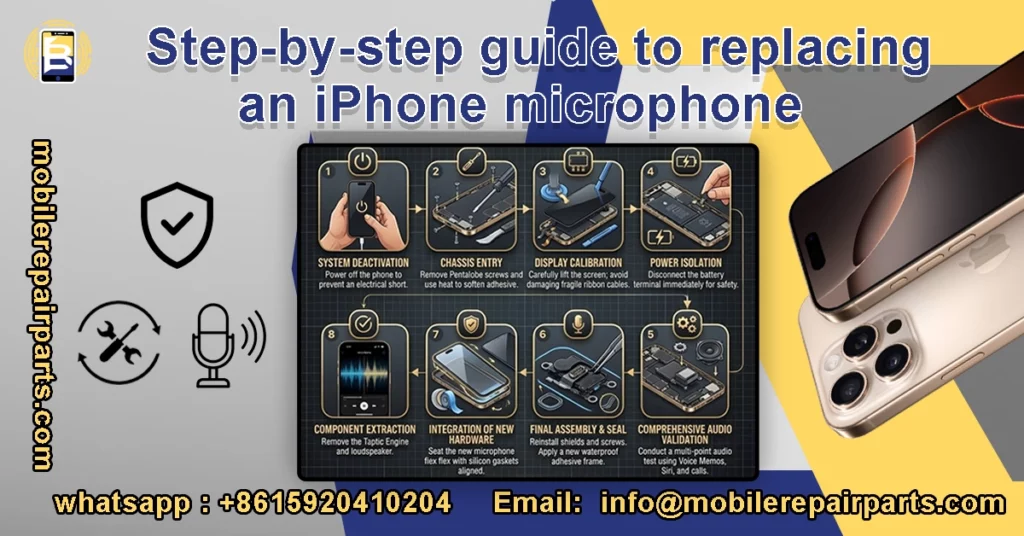
Successfully replacing an iPhone microphone requires skill and a precise, step-by-step workflow to maintain the phone’s integrity and full functionality.
- System Deactivation: Always begin by powering off the mobile phone to prevent any electrical short-circuits during the iPhone microphone replacement process.
- Chassis Entry: Remove the proprietary Pentalobe screws located at the base. Use a precision heat manifold to soften the display adhesive.
- Display Calibration: Carefully lift the screen using a vacuum opener and a spudger. Extreme caution is required here to avoid damaging the delicate ribbon cables.
- Power Isolation: Disconnect the battery terminal immediately. This is a non-negotiable safety step in every iPhone recording microphone replacement procedure.
- Component Extraction: Systematically remove the Taptic Engine and loudspeaker to gain access to the primary charging port flex assembly, which houses the microphone.
- Integration of New Hardware: Seat the high-quality iPhone microphone replacement flex into the chassis. Ensure the silicon gaskets are perfectly aligned to maintain sound isolation.
- Final Assembly & Seal: Reinstall all internal shields and screws. Apply a new waterproof adhesive frame to restore the device’s environmental sealing.
- Comprehensive Audio Validation: Conduct a multi-point test using Voice Memos, Siri, and cellular calls to confirm the success of the microphone replacement.
Why is precision important when replacing an iPhone mic?
Precision makes the difference between a permanent repair and a customer returning for a warranty claim. Using low-quality flexible cables can result in muffled sound or weak signal after a short period of time. At BETA Electronic Co LTD, we ensure that every iPhone microphone replacement is done with high-quality parts, preserving your shop’s reputation and ensuring long-term customer satisfaction.
Which iPhone Models Generate the Highest Demand for Microphone Replacement?
In Latin America, demand is growing for iPhone microphone replacements in iPhone 11, iPhone 12, iPhone 13, and iPhone XR phones.
Older models are still circulating in secondary markets, making microphone repairs profitable and ongoing. For instance, if you are handling or considering the iPhone XS purchase in 2025, understanding its repairability and common hardware issues is essential for long-term value. This sustained demand ensures that technicians who stock high-quality parts for these legacy phones remain competitive in the repair industry.
What makes the iPhone 16 microphone replacement process different from previous models?
Apple has made radical improvements to the iPhone 16 in terms of sound processing thanks to the A18 chip, which makes the microphones work more harmoniously to isolate noise. When performing an iPhone 16 microphone replacement, it is important to note that the bottom microphone is integrated into the charging flex that supports high USB-C data transfer speeds. Using non-standard parts will result in poor sound quality and also cause problems with charging speed or accessory recognition, so precision in selecting components for the iPhone 16 is key to successful maintenance.
How has the advanced design of the iPhone 17 microphones affected maintenance?
Apple has adopted more advanced MEMS microphones in the iPhone 17 that support professional video audio recording features (Spatial Audio). This means that any malfunction in the microphone will not only affect calls, but the mobile phone will also lose its cinematic features. When considering iPhone microphone replacement for these newer models, it is important to ensure that the replacement part supports the high frequency range, as using low-quality counterfeit parts will inevitably lead to failure in AI-powered sound processing, significantly reducing the value of the mobile phone.
How Can Wholesalers Ensure Quality When Sourcing iPhone Microphone Replacement Parts?
Wholesalers distributing their products in Latin America face higher risks due to long distances and varied climatic conditions. It is essential to maintain a low rate of return merchandise authorizations (RMAs) in order to achieve long-term profitability. To reduce the cost of cross-border returns, every shipment imported from China must undergo rigorous professional inspections prior to shipment.
- Acoustic Sensitivity Testing: Measuring decibel response and frequency range to ensure the iPhone mic replacement matches the original OEM clarity.
- Flex Cable Durability Inspection: Stress-testing the flexible PCB to ensure it can withstand the bends required during installation without micro-fractures.
- Connector Alignment Precision: Verifying that the FPC connectors are manufactured with micron-level accuracy for a perfect “click” fit on the logic board.
- Environmental and Corrosion Resistance: Testing the gold-plated contacts for oxidation resistance, ensuring the iPhone microphone replacement functions reliably in humid or coastal climates.
- Anti-Static (ESD) Packaging: Confirming that all parts are sealed in premium anti-static shielding to prevent latent electrical damage during transit.
FAQs About iPhone Microphone Replacement
Can the microphone be repaired without opening the phone?
Only if the problem is related to dirt or software. If the internal phone is torn or shorted due to liquid, there are no “apps” or “cleaners” that can fix it, and the iPhone microphone must be physically replaced.
How can I identify which iPhone microphone is faulty?
Most iPhones have multiple microphones (bottom mic, front mic, rear mic, noise-canceling mic). Diagnosis involves testing calls, Voice Memos, FaceTime, and video recording to determine which mic needs replacement.
Where Can You Find the Best Quality Parts for iPhone Microphone Replacement?
For high-quality iPhone microphone replacement parts, we recommend Beta Electronic Co LTD. A company specializing in wholesale phone parts from China, they offer tested, high-quality kits and charging stations that meet quality standards for clear sound and reliable signal.
Why is my iPhone microphone still not working after replacement?
If a new microphone doesn’t solve the issue, the problem might be a “Long Screw Damage” on the motherboard or a fault in the Audio IC (Integrated Circuit). Additionally, ensure that the rubber gasket is properly transferred to the new mic; without it, sound waves won’t reach the sensor correctly, causing muffled or faint audio.
Can a damaged iPhone microphone affect video recording quality?
Yes. A faulty iPhone microphone can significantly reduce video recording quality. If the rear or front microphone is damaged, recorded videos may contain muffled sound, background noise, or even completely silent audio tracks. In such cases, replacing the correct iPhone microphone module is necessary to restore proper audio recording performance.
Audio issues can be annoying, but with the right diagnosis, they are often easy to fix, whether through simple cleaning or replacing the entire iPhone microphone to restore the phone to peak performance using high-quality parts and professional tools.
For reliable components you can count on, visit mobilerepairparts.com and ensure that every repair meets the highest standards.