BETA Electronic Co LTD

BETA Electronic Co LTD

BETA Electronic Co LTD

iPhone 15 Screen Repair Guide for Latin American Businesses


Smartphone repair businesses across Latin America can boost their profit margins by up to 45% through strategic sourcing of iPhone 15 screen components. With Apple's latest model dominating premium markets, repair shops that master this niche gain significant competitive advantage.

Understanding the technical specifications, repair procedures, and quality assessment of the iPhone 15 screen is crucial for maintaining service excellence. 

KEY TAKEAWAYS
  • Latin American repair shops can boost profits by specializing in iPhone 15 screen replacements.
  • Mastering technical specs ensures accurate diagnostics and quality part sourcing.
  • Proper tools and standardized procedures are essential for efficient repairs.
  • Quality assessment protocols minimize returns and enhance customer satisfaction.
  • Staying updated on screen technology trends provides competitive advantage.
  • Training technicians on calibration techniques ensures optimal device functionality.

iPhone 15 Screen Specifications and Technology

The iPhone 15 screen represents Apple's most advanced display technology to date, featuring enhanced durability and improved color accuracy. For repair businesses in Latin America, understanding these specifications is essential to properly diagnose issues and source compatible replacement parts.

Specification Detail
Display Type Super Retina XDR OLED
Size 6.1 inches (diagonal)
Resolution 2556 x 1179 pixels at 460 ppi
Brightness 1000 nits typical, 2000 nits peak HDR
Contrast Ratio 2,000,000:1
True Tone Yes
Wide Color (P3) Yes
Haptic Touch Yes
Oleophobic Coating Yes
Ceramic Shield Yes

Display Panel Composition and Construction

The iPhone 15 screen utilizes a multi-layered construction that requires specialized tools and techniques for proper disassembly. Understanding this composition helps prevent damage during repair and ensures optimal performance post-installation.

Installation steps:

  1. Power off device and remove sim For connector tray
  2. Heat screen edges to soften adhesive
  3. Use suction cup and precision tools to separate screen
  4. Disconnect display and digitizer cables
  5. Remove remaining adhesive from frame
  6. Apply new adhesive to replacement screen
  7. Connect cables and carefully align screen
  8. Apply pressure to secure adhesive bond
  9. Test functionality before final sealing

Key Technical Specifications and Features

The iPhone 15 screen incorporates several technological advancements that impact repair procedures and parts compatibility. These specifications directly influence the repair process and the quality of replacement parts you should source for your business.

Feature Description
Dynamic Island Replaces notch, integrates with iOS for notifications
ProMotion Technology 120Hz adaptive refresh rate for smoother scrolling
Always-On Display Shows time, widgets, and notifications when locked
HDR Support Dolby Vision, HDR10, and HLG content support
P3 Wide Color Wider color gamut for more vibrant images
True Tone Automatically adjusts white balance based on ambient light
Haptic Touch Pressure-sensitive touch feedback
Ceramic Shield Improved durability and drop protection

Comparison with Previous iPhone Screen Technologies

The iPhone 15 screen introduces several improvements Compared with the iPhone 14 screen and iPhone 13 screen, including enhanced brightness and more efficient power consumption. For repair businesses, understanding these differences is crucial for proper diagnostics and customer communication.

Feature iPhone 15 iPhone 14 iPhone 13
Display Type Retina XDR OLED Super Retina XDR OLED Retina XDR OLED
Size 6.1 inches 6.1 inches 6.1 inches
Resolution 2556 x 1179 2556 x 1179 2532 x 1170
Brightness (typical) 1000 nits 800 nits 800 nits
Peak HDR Brightness 2000 nits 1200 nits 1200 nits
Refresh Rate 120Hz ProMotion 60Hz 60Hz
Dynamic Island Yes No No
Always-On Display Yes No No
Ceramic Shield Enhanced Standard Standard

read also:

iPhone 15 Screen Repair Procedures

Efficient iPhone 15 screen repair requires standardized procedures that balance speed and quality. Developing a consistent workflow helps your technicians complete repairs faster while maintaining the high standards customers expect from professional service providers.

Repair steps:

  1. Initial device diagnostics and documentation
  2. Data backup recommendation
  3. Disassembly following manufacturer guidelines
  4. Component removal and replacement
  5. Reassembly and adhesive application
  6. Functional testing and calibration
  7. Quality control inspection
  8. Final testing and customer notification

Required Tools and Diagnostic Equipment

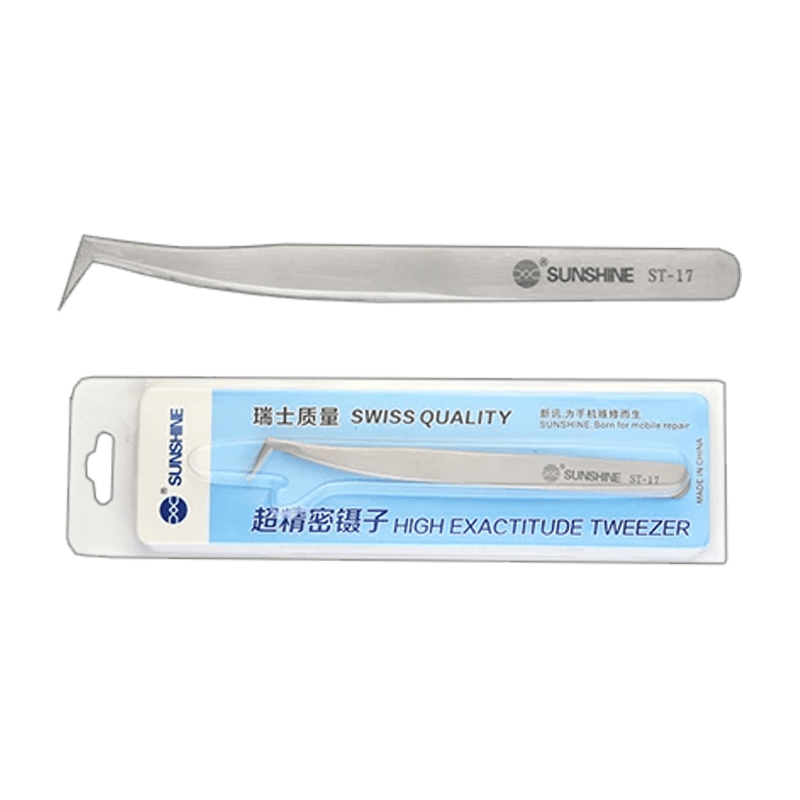
The specialized tools required for iPhone 15 repair represent a significant investment but are essential for delivering quality service. Having the right equipment prevents damage during disassembly and ensures proper reassembly of the device.

Required tools:

Screen Disassembly and Removal Process

The iPhone 15 screen disassembly requires careful attention to avoid damaging internal components. Following a systematic approach ensures safe removal of the damaged screen while preserving the device's structural integrity.

Disassembly steps:

  1. Back up device data via iCloud or computer
  2. Power off device completely
  3. Remove protective case and screen protector
  4. Heat screen edges to 80-85°C using heat gun
  5. Apply suction cup to lower portion of screen
  6. Create small gap with thin pry tool
  7. Slide opening pick around entire perimeter
  8. Lift screen carefully from bottom edge
  9. Disconnect battery connector first (safety precaution)
  10. Disconnect display and digitizer cables
  11. Remove screen assembly completely

Installation and Calibration Techniques

Proper installation of the replacement iPhone 15 screen is critical for device functionality and longevity. Precise calibration ensures touch sensitivity, display accuracy, and proper integration with the device's operating system.

Installation steps:

  1. Clean device frame thoroughly with isopropyl alcohol
  2. Apply new adhesive carefully around frame perimeter
  3. Connect display cables to motherboard
  4. Position replacement screen precisely
  5. Apply gentle pressure starting from center
  6. Remove any air bubbles using plastic card
  7. Power on device to test functionality
  8. Run diagnostic tests for touch and display
  9. Calibrate touch sensitivity through iOS settings
  10. Verify all functions including Face ID and proximity sensor

iPhone 15 Screen Quality Assessment and Troubleshooting

Effective quality assessment of iPhone 15 screens is essential for maintaining high repair standards and minimizing returns. Developing a systematic evaluation process helps your technicians identify potential issues before they reach your customers.

Common problems and fixes:

  • Touch unresponsive: Recalibrate digitizer through iOS settings
  • Display flickering: Check cable connections and reseat if necessary
  • Dead pixels: Run pixel refresh tool or replace screen if persistent
  • Color distortion: Adjust display settings or reset to factory defaults
  • Brightness issues: Reset display settings or check ambient light sensor
  • Screen ghosting: Perform hard reset or update iOS software
  • Cracks spreading: Apply temporary screen protector until replacement
  • Water damage indicators: Check internal sensors and assess corrosion
  • Battery drain after replacement: Verify proper cable connections
  • Face ID not working: Check TrueDepth camera alignment and connections

FAQ iPhone 15 Screen

1What certifications should I look for when sourcing iPhone 15 screens?
Choose suppliers with ISO 9001 certification and provide quality test reports for each batch.
2How can I train technicians on iPhone 15 screen repairs?
Enroll in Apple-certified repair programs or partner with technical schools offering specialized courses.
3What warranty terms should I offer for screen replacements?
Provide 6-12 month warranties covering defects, excluding physical damage or liquid exposure.
4How do I comply with e-waste regulations for damaged screens?
Partner with certified recyclers and follow local laws like Mexico's NOM-161-SEMARNAT-2011.
5What’s the best way to document repairs for customers?
Use digital repair tickets with photos, part serial numbers, and technician signatures.

Mastering iPhone 15 screen repairs significantly boosts your repair business profitability. For premium quality screens at wholesale prices, Get instant bulk pricing now.

IMPORTANT

Latin American repair businesses stand to gain substantially by specializing in iPhone 15 screen replacements, as Apple's latest flagship continues to capture significant market share across the region. This technical guide equips service providers with the essential knowledge needed to capitalize on this growing demand.

The advanced OLED technology, Ceramic Shield protection, and Dynamic Island feature present both opportunities and challenges for repair technicians. Mastering proper disassembly techniques, calibration procedures, and quality assessment methods will position your business as a trusted service provider in this competitive market segment.
Leave a Reply

Your email address will not be published. Required fields are marked *


Smartphone repair businesses across Latin America can boost their profit margins by up to 45% through strategic sourcing of iPhone 15 screen components. With Apple's latest model dominating premium markets, repair shops that master this niche gain significant competitive advantage.

Understanding the technical specifications, repair procedures, and quality assessment of the iPhone 15 screen is crucial for maintaining service excellence. 

KEY TAKEAWAYS
  • Latin American repair shops can boost profits by specializing in iPhone 15 screen replacements.
  • Mastering technical specs ensures accurate diagnostics and quality part sourcing.
  • Proper tools and standardized procedures are essential for efficient repairs.
  • Quality assessment protocols minimize returns and enhance customer satisfaction.
  • Staying updated on screen technology trends provides competitive advantage.
  • Training technicians on calibration techniques ensures optimal device functionality.

iPhone 15 Screen Specifications and Technology

The iPhone 15 screen represents Apple's most advanced display technology to date, featuring enhanced durability and improved color accuracy. For repair businesses in Latin America, understanding these specifications is essential to properly diagnose issues and source compatible replacement parts.

Specification Detail
Display Type Super Retina XDR OLED
Size 6.1 inches (diagonal)
Resolution 2556 x 1179 pixels at 460 ppi
Brightness 1000 nits typical, 2000 nits peak HDR
Contrast Ratio 2,000,000:1
True Tone Yes
Wide Color (P3) Yes
Haptic Touch Yes
Oleophobic Coating Yes
Ceramic Shield Yes

Display Panel Composition and Construction

The iPhone 15 screen utilizes a multi-layered construction that requires specialized tools and techniques for proper disassembly. Understanding this composition helps prevent damage during repair and ensures optimal performance post-installation.

Installation steps:

  1. Power off device and remove sim For connector tray
  2. Heat screen edges to soften adhesive
  3. Use suction cup and precision tools to separate screen
  4. Disconnect display and digitizer cables
  5. Remove remaining adhesive from frame
  6. Apply new adhesive to replacement screen
  7. Connect cables and carefully align screen
  8. Apply pressure to secure adhesive bond
  9. Test functionality before final sealing

Key Technical Specifications and Features

The iPhone 15 screen incorporates several technological advancements that impact repair procedures and parts compatibility. These specifications directly influence the repair process and the quality of replacement parts you should source for your business.

Feature Description
Dynamic Island Replaces notch, integrates with iOS for notifications
ProMotion Technology 120Hz adaptive refresh rate for smoother scrolling
Always-On Display Shows time, widgets, and notifications when locked
HDR Support Dolby Vision, HDR10, and HLG content support
P3 Wide Color Wider color gamut for more vibrant images
True Tone Automatically adjusts white balance based on ambient light
Haptic Touch Pressure-sensitive touch feedback
Ceramic Shield Improved durability and drop protection

Comparison with Previous iPhone Screen Technologies

The iPhone 15 screen introduces several improvements Compared with the iPhone 14 screen and iPhone 13 screen, including enhanced brightness and more efficient power consumption. For repair businesses, understanding these differences is crucial for proper diagnostics and customer communication.

Feature iPhone 15 iPhone 14 iPhone 13
Display Type Retina XDR OLED Super Retina XDR OLED Retina XDR OLED
Size 6.1 inches 6.1 inches 6.1 inches
Resolution 2556 x 1179 2556 x 1179 2532 x 1170
Brightness (typical) 1000 nits 800 nits 800 nits
Peak HDR Brightness 2000 nits 1200 nits 1200 nits
Refresh Rate 120Hz ProMotion 60Hz 60Hz
Dynamic Island Yes No No
Always-On Display Yes No No
Ceramic Shield Enhanced Standard Standard

read also:

iPhone 15 Screen Repair Procedures

Efficient iPhone 15 screen repair requires standardized procedures that balance speed and quality. Developing a consistent workflow helps your technicians complete repairs faster while maintaining the high standards customers expect from professional service providers.

Repair steps:

  1. Initial device diagnostics and documentation
  2. Data backup recommendation
  3. Disassembly following manufacturer guidelines
  4. Component removal and replacement
  5. Reassembly and adhesive application
  6. Functional testing and calibration
  7. Quality control inspection
  8. Final testing and customer notification

Required Tools and Diagnostic Equipment

The specialized tools required for iPhone 15 repair represent a significant investment but are essential for delivering quality service. Having the right equipment prevents damage during disassembly and ensures proper reassembly of the device.

Required tools:

Screen Disassembly and Removal Process

The iPhone 15 screen disassembly requires careful attention to avoid damaging internal components. Following a systematic approach ensures safe removal of the damaged screen while preserving the device's structural integrity.

Disassembly steps:

  1. Back up device data via iCloud or computer
  2. Power off device completely
  3. Remove protective case and screen protector
  4. Heat screen edges to 80-85°C using heat gun
  5. Apply suction cup to lower portion of screen
  6. Create small gap with thin pry tool
  7. Slide opening pick around entire perimeter
  8. Lift screen carefully from bottom edge
  9. Disconnect battery connector first (safety precaution)
  10. Disconnect display and digitizer cables
  11. Remove screen assembly completely

Installation and Calibration Techniques

Proper installation of the replacement iPhone 15 screen is critical for device functionality and longevity. Precise calibration ensures touch sensitivity, display accuracy, and proper integration with the device's operating system.

Installation steps:

  1. Clean device frame thoroughly with isopropyl alcohol
  2. Apply new adhesive carefully around frame perimeter
  3. Connect display cables to motherboard
  4. Position replacement screen precisely
  5. Apply gentle pressure starting from center
  6. Remove any air bubbles using plastic card
  7. Power on device to test functionality
  8. Run diagnostic tests for touch and display
  9. Calibrate touch sensitivity through iOS settings
  10. Verify all functions including Face ID and proximity sensor

iPhone 15 Screen Quality Assessment and Troubleshooting

Effective quality assessment of iPhone 15 screens is essential for maintaining high repair standards and minimizing returns. Developing a systematic evaluation process helps your technicians identify potential issues before they reach your customers.

Common problems and fixes:

  • Touch unresponsive: Recalibrate digitizer through iOS settings
  • Display flickering: Check cable connections and reseat if necessary
  • Dead pixels: Run pixel refresh tool or replace screen if persistent
  • Color distortion: Adjust display settings or reset to factory defaults
  • Brightness issues: Reset display settings or check ambient light sensor
  • Screen ghosting: Perform hard reset or update iOS software
  • Cracks spreading: Apply temporary screen protector until replacement
  • Water damage indicators: Check internal sensors and assess corrosion
  • Battery drain after replacement: Verify proper cable connections
  • Face ID not working: Check TrueDepth camera alignment and connections

FAQ iPhone 15 Screen

1What certifications should I look for when sourcing iPhone 15 screens?
Choose suppliers with ISO 9001 certification and provide quality test reports for each batch.
2How can I train technicians on iPhone 15 screen repairs?
Enroll in Apple-certified repair programs or partner with technical schools offering specialized courses.
3What warranty terms should I offer for screen replacements?
Provide 6-12 month warranties covering defects, excluding physical damage or liquid exposure.
4How do I comply with e-waste regulations for damaged screens?
Partner with certified recyclers and follow local laws like Mexico's NOM-161-SEMARNAT-2011.
5What’s the best way to document repairs for customers?
Use digital repair tickets with photos, part serial numbers, and technician signatures.

Mastering iPhone 15 screen repairs significantly boosts your repair business profitability. For premium quality screens at wholesale prices, Get instant bulk pricing now.

IMPORTANT

Latin American repair businesses stand to gain substantially by specializing in iPhone 15 screen replacements, as Apple's latest flagship continues to capture significant market share across the region. This technical guide equips service providers with the essential knowledge needed to capitalize on this growing demand.

The advanced OLED technology, Ceramic Shield protection, and Dynamic Island feature present both opportunities and challenges for repair technicians. Mastering proper disassembly techniques, calibration procedures, and quality assessment methods will position your business as a trusted service provider in this competitive market segment.

Leave a Reply

Your email address will not be published. Required fields are marked *


Products

iPhone 15 Screen Repair Guide for Latin American Businesses
This website uses cookies to improve your experience. By using this website you agree to our Data Protection Policy.
Read more